

Decide whether the row is an element
Revit schedules usually report model elements, but teams sometimes need a table for decisions with no corresponding object. A hypothetical design-options register might list alternative transfer concepts, the decision owner and next review date. Creating geometry solely to host rows can confuse users if the objects look like construction content. Decide whether the register belongs in Revit, an issue system or a controlled spreadsheet. Revit may suit a table that needs to appear on a sheet or in the model workspace. A separate system may fit better when approvals, notifications or audit history exceed the model’s role.
Choose a transparent storage method
A key schedule built from an unused category and a CSV-driven schedule tool are different techniques with different constraints. Evaluate them in the current Revit version and approved add-in environment. Ensure a chosen category is genuinely unused and will not later become project content. Explain the workaround in the schedule name and project guide. Do not use a category another discipline relies on without coordination. A placeholder table can affect model audits or confuse an exported model. If an external tool is used, confirm who maintains it and whether users can run it.
Create fields before rows
Define columns before populating the register. Each field needs a clear meaning, data type and owner. A decision register might include option identifier, description, responsible discipline, review date and disposition. Use a stable key so updates do not create duplicates. If an import expects a key or parameter names to exist, prepare and test definitions first. Use a small sample with ordinary, blank and punctuation-containing values. Confirm how the tool handles delimiters, quotes and encoding. Do not assume spreadsheet column order maps correctly to Revit parameters.
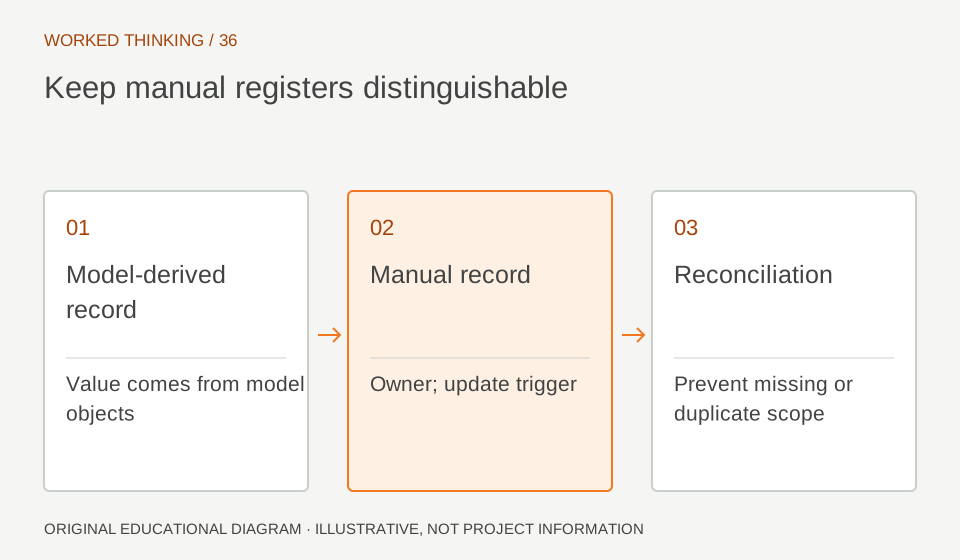
Read diagram notes
- Model-derived record
- Value comes from model objects
- Manual record
- Owner; update trigger
- Reconciliation
- Prevent missing or duplicate scope
Make the source visible
Every row should identify where its information came from and when it was last checked. If an external spreadsheet is authoritative, state that Revit contains a convenience copy and explain reconciliation. If Revit is the maintained register, assign an editor and protect it from casual changes. An “Approved” value requires an authority and reference. Add a decision record ID or link where project rules permit. Avoid recording technical conclusions without traceable evidence. The table organizes information; it does not make it current or approved merely by existing in the model.
Prevent confusion with geometry
Name the schedule so readers can tell it is a register, not an element quantity schedule. If a host category or dummy element is involved, document that clearly and keep the placeholder out of views, exports and counts where appropriate. Verify model-checking rules do not misclassify it. Before sharing, inspect underlying elements and category. Confirm receivers will not interpret them as structural objects. If a table can be placed on a sheet without a placeholder, test whether that is clearer.
Reconcile external updates
If reviewers complete a spreadsheet, preserve a controlled outgoing copy and compare the returned file before updating the model. Match rows by stable identifier, not row order. Highlight additions, deletions and changed values. Resolve conflicts with the named owner rather than accepting every returned cell. Test a round trip on a disposable model and keep a pre-import state. Check missing rows, duplicate keys, truncated text and formatting. Record import date and file revision. These controls protect the register from overwrites and make changes explainable.
State limits at issue
A decision register is not a substitute for structural analysis, calculations, model coordination or formal approval. It can list options and track follow-up, but technical acceptance belongs to the authorized engineer and project process. At issue, identify the register’s purpose, source, date and outstanding decisions. If rows are disconnected from model elements, state that limit. The team can use the table as a traceable planning aid without mistaking it for a model-derived quantity or approved design record. Before every publication, check that each row has a stable identifier, a current owner and a disposition or next action. Compare the register with the formal issue log so duplicate or closed items are not presented as active. If a row records a design choice, include its decision reference rather than copying a short label alone. These small controls help readers distinguish a live decision from an archive or model placeholder.