

Evaluate continuity alongside capability
AEC Magazine’s discussion of emerging BIM platforms highlights questions around openness, workflows and dependence on particular systems. A project team can turn those questions into a concrete trial: preserve a small package of information, then attempt to use it outside its original platform. The following exit rehearsal is an original example. It does not assume that a particular vendor currently supports every export described.
Define the package that must survive
Choose one floor or infrastructure segment. Include a model revision, a drawing, three issues, a decision and a small asset schedule. For each item, identify the future reader and the information they must retain. A model viewer may need geometry and identifiers; an issue reviewer also needs the discussion, ownership and linked viewpoint. A PDF screenshot alone may preserve appearance while losing the relationships required for later work.
Write an exit checklist before the demo
Ask the platform team to show the available exports using your trial information. Record file formats, fields, attachment handling and any access restrictions. Check whether exports can be made by the role that will actually manage the project. Distinguish a documented feature from a promised roadmap item. Record what requires manual work, a paid service or continued access to an account. Compare those dependencies with your project’s archiving requirements.
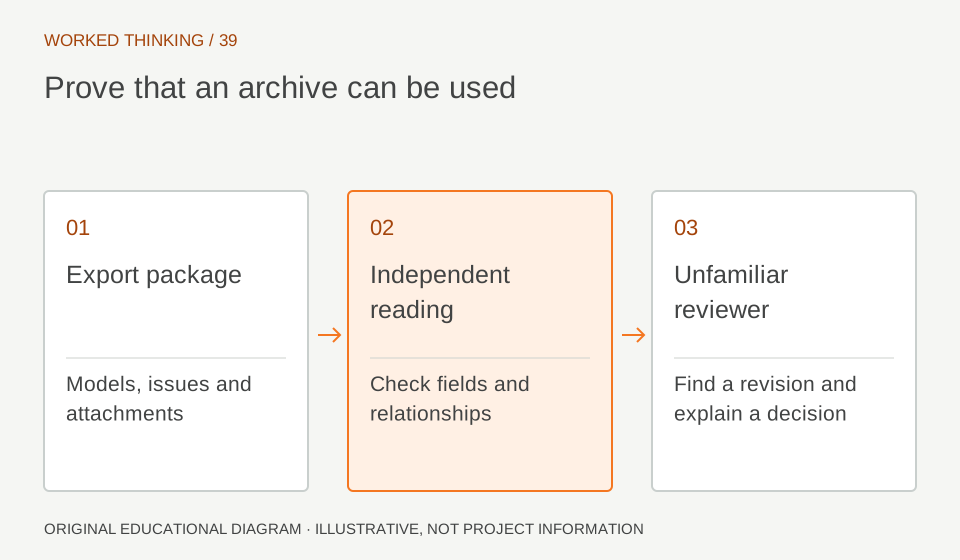
Read diagram notes
- Export package
- Models, issues and attachments
- Independent reading
- Check fields and relationships
- Unfamiliar reviewer
- Find a revision and explain a decision
Read the export in a separate environment
Open the exported model with an independent suitable viewer. Compare a short schedule of identifiers, properties and object counts. Follow issue references back to identifiable model objects and the correct revision. Open attachments from the archive without relying on a link to the original service. Broken relationships matter even when every file appears to have downloaded successfully. Keep a list of information that is present, transformed or missing.
Rehearse a real handover
Give the package and its index to a colleague who did not assemble it. Ask them to locate the latest accepted model, explain one decision and identify an unresolved issue. Record where they need help. This is a usability test of the archive, not a speed contest. If a familiar project team struggles to interpret the package after one week, an unfamiliar operations team will need much clearer indexing and context.
Agree the recovery route
Keep the pilot source intact until the exported package has been reviewed. Decide which information would be re-entered manually and who would authorise the work if a migration became necessary. Include the time required for checking relationships, not only the time to transfer files. Schedule another rehearsal after major workflow changes. A one-time export at procurement does not prove that a more complex project archive will remain usable.
Use the evidence in the decision
Summarise the trial in a capability matrix: required information, export method, independent check, limitations and responsible owner. Evaluate usability and project value alongside portability. The objective is not to reject every system with a constraint. It is to make the constraint visible while the team still has choices, and to avoid treating continued access to a particular service as the only form of project memory.