

Classification needs a stated purpose
AEC Magazine’s Bond Bryan Digital profile discusses classification and checking information beyond visible geometry. An original structural workflow can apply that principle by defining what a classification field is meant to support. It may be used to group quantities, locate assets or test a deliverable. The dictionary below is a hypothetical project aid. It does not prescribe a particular classification system or substitute for the client’s information requirements.
Separate the code from the display name
Record the selected system, edition or version, code and preferred label in separate fields where the workflow allows. A label can be translated or abbreviated while the underlying code remains the reference. Do not assume two identical labels mean the same thing in different systems. Likewise, a familiar code should not be used without checking its meaning in the selected edition. Keep the authoritative source for the classification alongside the mapping.
Define the object being classified
Clarify whether the field describes an element, a system, a product or another agreed entity. A structural assembly and its individual components may need different treatment. Avoid placing a convenient code on a whole model merely because the software offers one obvious field. Review a small sample of beams, columns, slabs and compound objects. Document how nested or grouped objects are included so that downstream schedules do not double-count classified records.
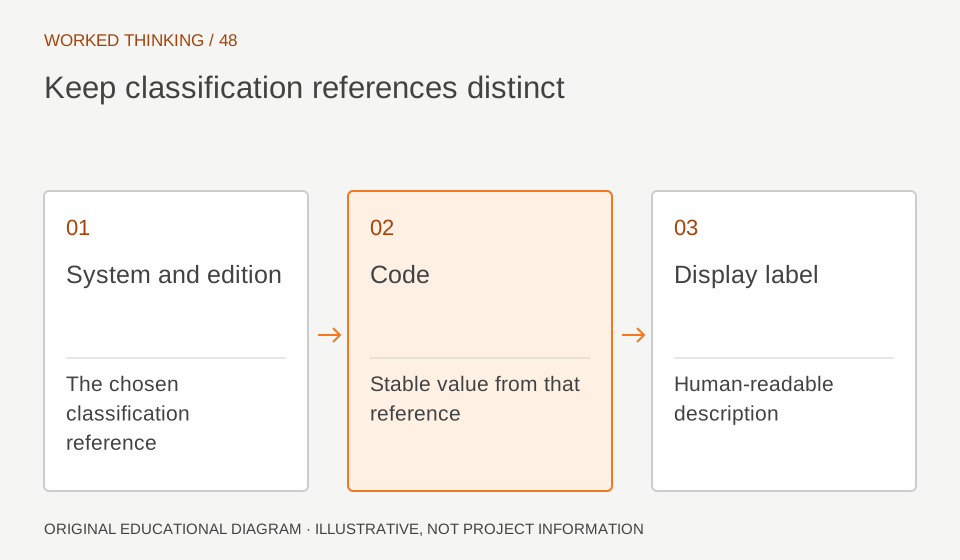
Read diagram notes
- System and edition
- The chosen classification reference
- Code
- Stable value from that reference
- Display label
- Human-readable description
Use a controlled mapping table
Create rows for the relevant authoring categories or types, their intended meaning and the accepted classification values. Include an exception column and a reviewer. Where a single authoring category contains different functions, require more information before assigning a code automatically. A category name is not always enough to infer the intended function. Keep unconfirmed mappings visible instead of using a generic fallback that makes every object appear classified.
Test the receiving representation
Export a small sample and inspect where the classification appears in the receiving tool. Compare code, system identifier and label with the reference table. Test one deliberately unmapped object to confirm that the gap remains visible. Record the exchange settings and any transformation applied by the receiver. A correct authoring schedule is not sufficient evidence if the classification is dropped or moved into an unusable field during delivery.
Control changes to the dictionary
Assign an owner to the mapping and record each accepted revision. When a code or mapping changes, identify affected objects and downstream reports. Do not silently replace the dictionary while leaving earlier deliverables unexplained. Keep the project’s chosen edition stable unless a change is deliberately agreed. If two organisations use different systems, preserve both references and document the mapping rather than pretending that a one-to-one relationship always exists.
Make the dictionary easy to use
Include a concise definition, one relevant example and a route for reporting uncertainty. Review the exceptions with the people producing and consuming the information. The aim is not a long document that nobody consults. It is a dependable reference that helps the same object retain its intended meaning when it moves between disciplines, tools and project stages.