

Automation needs a defined authority
AEC Magazine’s NXT BLD themes discuss increasing automation and AI in design and construction workflows. The practical response is to define what an automated process may do and who accepts its result. This independent guide uses a hypothetical parameter-cleaning task. It is not a recommendation to automate structural design decisions, nor a claim that an AI system can certify the correctness of engineering information.
Begin with a read-only report
Select a narrow task such as identifying missing structural member marks. Run the process without changing the model. Ask it to return object identifiers, observed values and the rule used to flag each record. Review false positives and missed cases using a small test set. The first success criterion is an understandable report. It is not the number of objects the process can modify in one operation.
Separate a suggestion from a model edit
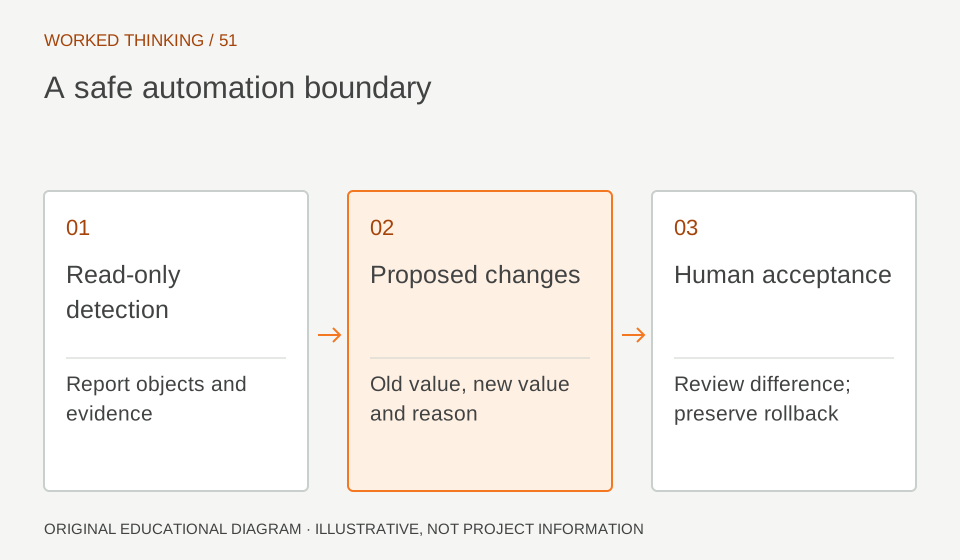
If the next stage proposes corrections, show the existing value, proposed value and reason before applying anything. Keep ambiguous cases unresolved rather than inventing a value. A suggested mark can be reviewed against an agreed naming rule; a suggested section or support change requires a different level of engineering authority. Define these boundaries in the workflow so that a convenient automation tool cannot silently expand its own scope.
Read diagram notes
- Read-only detection
- Report objects and evidence
- Proposed changes
- Old value, new value and reason
- Human acceptance
- Review difference; preserve rollback
Use a controlled test copy
Preserve the original model and run changes on a clearly identified test copy. Include ordinary cases, missing data, duplicate values and objects outside the intended scope. Verify that excluded objects remain unchanged. Record the tool or script version, input revision and settings. When the process depends on a language model, retain the relevant prompt and output as part of the review evidence while excluding sensitive project data from unapproved services.
Review the difference, not only the message
Compare the result against the baseline using an appropriate model or data comparison. Confirm that every actual change matches an accepted proposal. A success notification from the tool is not independent evidence of the result. Check related schedules and identifiers where the edit could affect downstream work. If the process touches structural assumptions, route the result to the responsible structural engineer before it becomes an accepted project change.
Define a stop and recovery condition
Stop when the output contains unexplained changes, broken identifiers or behaviour outside the agreed task. Retain the failed output for investigation and restore the known baseline through the project’s normal version process. Avoid immediately running another repair routine over an unexplained result. Recovery should be tested while the dataset is small. A workflow that cannot explain or reverse a change is not ready to scale.
Scale the permission as evidence grows
Expand the task only after the team can reproduce its results and identify its limits. Keep review responsibility visible and revisit the checks when software, rules or model conventions change. Automation can save time by handling repetitive operations, but professional trust comes from controlled inputs, visible changes and accountable acceptance. The human gate should be a meaningful review of evidence, not a button clicked after the work has already become irreversible.