

Ask an audit question
Every audit schedule should answer one specific question. “Which framing members lack a mark?” is more actionable than “Show all framing.” “Which structural views have no approved template?” can help a BIM lead prepare a package. Keep the question in the schedule name and explain what a highlighted row means. For a three-level frame, begin with exception schedules for unmarked columns and members lacking review state. Define scope and confirm categories and phases. A clean table may simply mean its filter excluded the problem elements, so validate rules before trusting an empty result. Treat each schedule as a testable control with a named owner.
Expose fields that explain rows
Include fields that explain why each row appears: category, family and type, level, mark, phase, status and filter inputs. Users can diagnose whether an item is a real exception or a bad value. Keep this expanded version as a working schedule even if an issue-facing version needs fewer fields. Group and sort to reveal patterns. Blank marks concentrated on one level may indicate a missed modelling pass. These patterns are clues, not conclusions. Check representative elements directly in the model before assigning cause. During setup, compare results against manually selected elements to detect category or phase omissions.
Use calculated output carefully
Calculated fields and conditional formatting can make tables easier to scan, but they depend on valid inputs and supported expressions. A status label generated from a yes/no field is convenient; it does not make the underlying field accurate. Test true, false and blank cases, and check data types and units. Keep source fields visible in the audit version and document how the display is produced. When formulas or Revit versions change, verify again. A red cell attracts attention, but only an authorized reviewer can decide whether an engineering condition is acceptable. Avoid presenting a derived label as a design check.
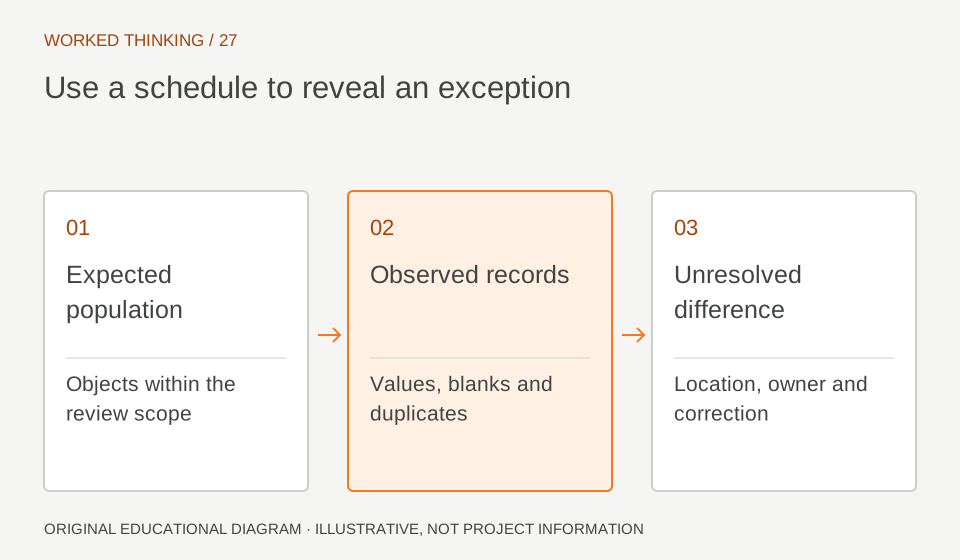
Read diagram notes
- Expected population
- Objects within the review scope
- Observed records
- Values, blanks and duplicates
- Unresolved difference
- Location, owner and correction
Separate working from issued schedules
A working schedule may include internal notes, phase, type and review owner. A printed schedule may omit these for clarity. Name the two purposes plainly and control which is placed on sheets. Verify filters and sorting after duplicating or editing. Compare the printed version with its working counterpart before issue. Removing columns should not remove a filter dependency or create ambiguous rows. Understand which fields are model data and which are display choices. Set a clear update rule so the presentation copy does not become a stale parallel record. Retain a clear route from a printed row to its model element.
Maintain a view register
A view list can serve as a project-control schedule if it exposes view name, associated level, template, phase, scale and sheet placement. For structural delivery, add grouping that distinguishes design, analytical review, coordination and issue views. The register can flag views lacking a template or expected sheet placement. It is a management aid, not proof that the view is technically correct. Sample important plans, sections and details visually. Keep the register internal if workflow fields would confuse drawing readers. During audits, confirm the listed template is actually controlling the intended view properties.
Check quantity logic
Schedules can count elements and summarize values, but results depend on categories, phase settings and inclusion criteria. Create a test area with known elements and compare its count to manual selection. Repeat with another level or phase to test filters. For quantities used beyond coordination, agree measurement basis and exclusions with the commercial lead. Revit’s length or count may differ from contract rules. Explain the distinction in the deliverable. A schedule reports model content under its rules, not an automatic verified bill of quantities. Record whether links, nested families and temporary objects are included.
Close the audit loop
Give each exception a resolution path. A person seeing an unmarked member should know whether to assign a mark, seek a design decision or report a modelling defect. Record issue, owner and due point through the accepted system. Re-run the schedule after correction and confirm the row leaves for the expected reason. At a milestone, preserve criteria and outstanding exceptions. Do not erase unresolved items to make the schedule look clean. Carry them into the issue note with explicit disposition. This turns the schedule into a repeatable check rather than a static table nobody owns.