

Build for the first hour
A template succeeds when a new team can perform common tasks without deciphering an inherited file. Observe the first hour: create a plan, section, tag, schedule and sheet. Record where users pause or vary. In a small engineering office, valuable defaults may be browser organization, a few structural view templates and a sheet numbering convention. Avoid importing every family and schedule ever used. Each item creates a maintenance obligation and can make the starter file harder to understand. Choose template content from observed repeated work, not from an abstract wish for completeness.
Define the browser map
Choose an organization that groups views by purpose and helps users find design, coordination, review and issue content. Use fields and naming consistently so the browser does not depend on memory. Keep groups limited enough that a new modeller can predict where a view belongs. Test a foundation plan, framing plan, section, 3D coordination view and detail. Check duplicate naming and phase progression. The map should reflect project work, not an idealized diagram. Add concise instructions when a convention is not self-evident. A second user should be able to file a new view without asking the template author.
Create templates with scope
Build only templates that answer recurring needs. Structural layout, coordination and sheet views may require different visibility and annotation. Identify controlled properties and adjustable settings. Name by purpose and discipline. Test templates on new and existing views. Confirm category visibility, filters, scale behavior, links and annotation. Where filters encode status, document meaning and govern values. Avoid templates controlling so many settings that users cannot understand why a view looks as it does. Defaults should be explainable and adaptable.
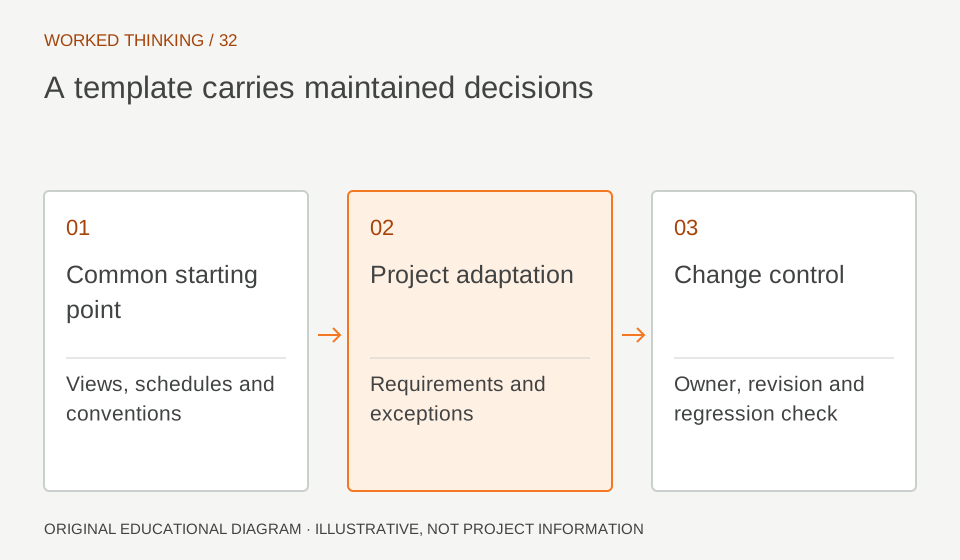
Read diagram notes
- Common starting point
- Views, schedules and conventions
- Project adaptation
- Requirements and exceptions
- Change control
- Owner, revision and regression check
Seed schedules and tags carefully
Include recurring schedules such as a member register only after fields and ownership are agreed. Label working schedules and distinguish them from issue schedules. Provide tags supporting the agreed marking convention, with tested bindings and readable text at target scales. Do not seed fields merely because one family exposes them. Keep the parameter schema controlled and test known elements, repeated types and exceptions. For tags, test long and blank values in typical views. A polished table that cannot reliably report the model is not a template benefit.
Use a welcome page as context
A welcome page can communicate template revision, project identity, units, model roles and setup steps. Keep it short and factual. Include fields the team will complete, such as project name, model author or issue date under company practice. Explain defaults that require review: levels, grids, phases, coordinates, links and discipline fields. Do not imply initial values are approved for a specific job. The template is a starting point. Tell users what to confirm, where the standard lives and whom to contact when the brief conflicts.
Pilot with real tasks
Use a small pilot or copy to run a realistic sequence: create views, place content, schedule, issue a sample sheet and exchange a model if needed. Record extra steps, confusing names, missing categories and performance concerns. Ask a user who did not author the template to complete it. Their experience is a stronger usability test than the owner’s familiarity. Keep a change log and adjust when there is a clear problem. Avoid adding one-off preferences without a repeatable need. Compare the pilot to a clean project setup so the value is observable.
Version and maintain
Assign an owner, revision convention and supported versions. Record parameter definitions, families, templates and limits. Explain what existing projects should update when the template changes. Keep an untouched source for comparison. Periodically remove obsolete content through controlled release. A test file should confirm schedules and views behave as documented. This checks the starting environment, not whether a project created from it is complete or compliant. Project teams remain responsible for project setup and engineering review. Set a review interval and a trigger for earlier review, such as a Revit upgrade, revised client deliverable or repeated user workaround. Track proposed changes with their project example and expected benefit. During release, compare a new test project against the prior template so removed fields or graphic changes are noticed. Publish a short change note that tells project teams whether updates are optional or required.